
Documentation
Usage Logs in the NexoRouter documentation.
Usage Logs
Status: Stable dashboard workflow.
Usage Logs are the first place to investigate production behavior. They connect a request to its API key, model, status, latency, token usage, cost, and request ID.
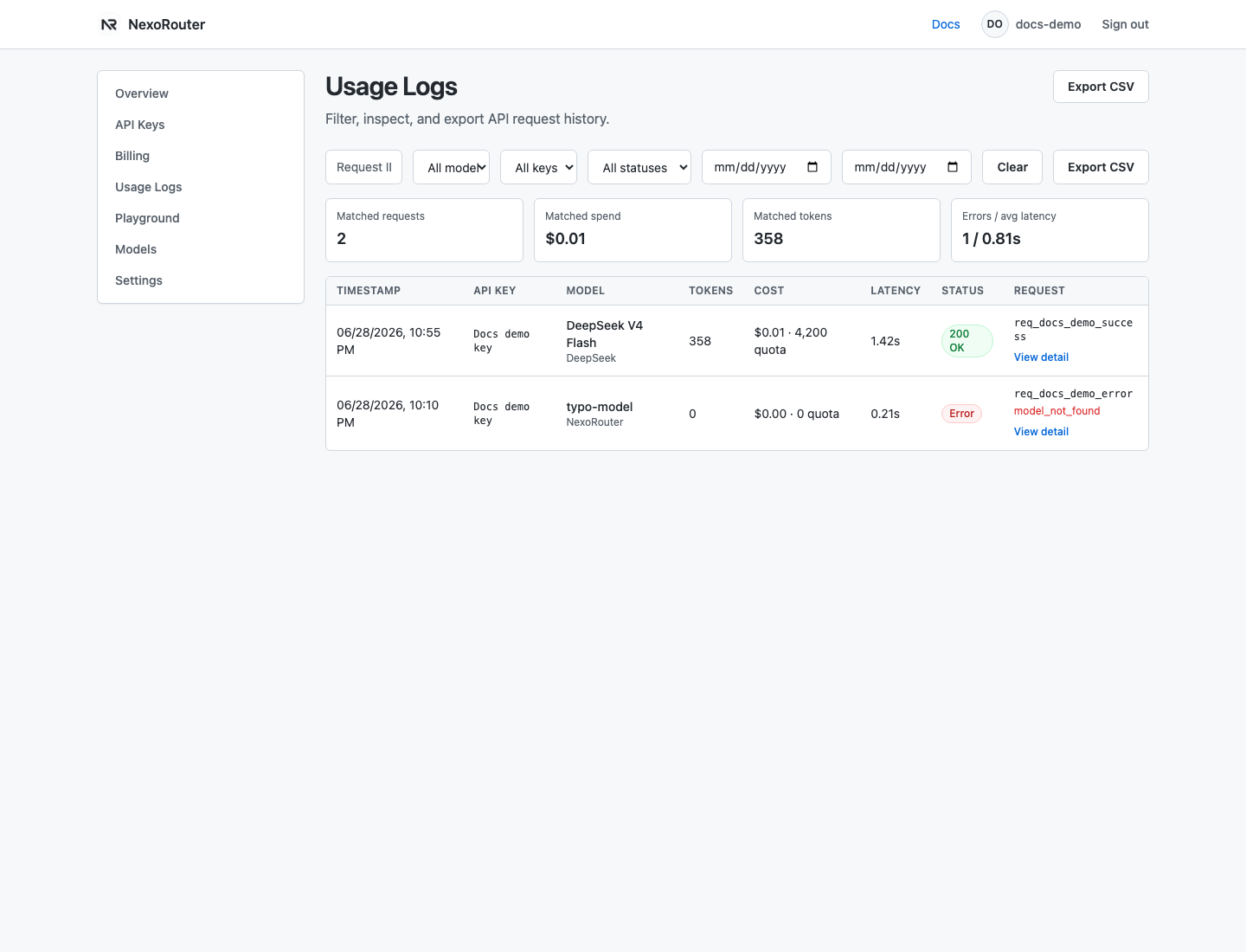
The dashboard screenshot above uses sanitized demo data. Real logs may include your own key names, model IDs, request IDs, cost, and error content.
What to check
| Field | Why it matters |
|---|---|
| Request ID | Use this when asking support to investigate a specific call. |
| API key | Confirms which app or tool sent the request. |
| Model | Confirms the exact model ID that reached the gateway. |
| Status | Separates success, user errors, quota errors, rate limits, and upstream failures. |
| Tokens and cost | Explains billing and budget consumption. |
| Latency | Helps distinguish slow models from client/network problems. |
Debug flow
- Copy the request ID from the client response or log entry.
- Filter Usage Logs by time range and API key.
- Compare the model ID in the log with the model ID in your tool config.
- Check whether the failure is before the provider, at the gateway, or upstream.
- Use the documented error code to choose the next fix.